How to Reduce the Physical Toll That Screentime Takes on Your Body
I am 27 years old, active and healthy. Yet, on any given afternoon, my upper back, shoulders and neck feel like they belong to someone twice my age.
It is a persistent, dull ache that has flared up on and off since my high school days, usually triggered by carrying a heavy bag or sitting for hours on end. But lately, the main culprit is my screen time, which I can only reduce so much because my livelihood depends on working at a computer. When I spend too much time slumped over a laptop or staring down at my phone, the stiffness becomes so overwhelming that it hijacks my focus, making it nearly impossible to get any actual work done.
Unfortunately, my experience is far from unique; it is a common reality in the modern workforce.
Our collective screen dependency has turned neck and back pain into a global public health crisis. A 2022 study on spinal health highlighted just how pervasive this “digital slouch” has become, indicating that roughly 73% of university students and 64.7% of work-from-home professionals suffer from chronic neck or back pain. Crucially, the study also noted that 39.2% of these individuals admit that this physical discomfort decreases their productivity.
The estimated costs to businesses from medical expenses, insurance and lost productivity due to ergonomically related injuries runs into the tens of billions of dollars. That in turn has created new businesses offering everything from better work stations, such as standing desks and chair-desk alignment that puts less stress on the spine, to physical therapy regimens.

Photo: Aaron Yoshino
Creating an Ergonomic Workspace
Ergonomics is the science of adapting the workplace to the worker. By structuring equipment and tasks around physical well-being, it directly boosts both comfort and performance.
One of the most basic applications of ergonomics is a desk set-up that promotes good posture. For those of us who spend our days in front of a screen, this starts with maintaining a neutral spine, whether sitting or standing. To achieve this alignment, keep your monitor roughly an arm’s length away and directly at eye level, so your head isn’t constantly tilting forward.
While the average adult head weighs only about 10 to 12 pounds in a neutral position, gravity and leverage multiply that load as it tilts forward. At just a 15° tilt, the pressure on your spine climbs to roughly 27 pounds. At 30°, it feels like 40 pounds; at 45°, it reaches 49 pounds; and at a steep 60° angle, your neck is straining under an astonishing 60 pounds of force, the physical equivalent of carrying a commercial microwave oven around your neck.
It’s also important to place your keyboard and mouse at or slightly below the height where your elbows naturally bend, preventing unnecessary strain on your shoulders and wrists.
Of course, practicing what you preach is easier said than done. I am guilty of hunching over my laptop on the couch or perching on an unforgiving stool at my kitchen counter almost daily, which are both terrible for my spine. While an adjustable office chair with built-in lumbar support is the gold standard, high-quality models can easily set you back several hundred dollars.
If you aren’t ready to shell out that kind of cash, you can often score premium chairs, desks and other ergonomic gear secondhand on platforms like Craigslist and Facebook Marketplace, or by hunting down local office and warehouse liquidation sales for discounted, gently used office furniture.
Ultimately, investing in a supportive workspace that fosters healthy habits is more than just a luxury, it is a vital preventative measure. Neglecting your posture today is a direct path to chronic, painful setbacks down the road, including debilitating conditions like “tech neck” and carpal tunnel syndrome.

Photo: Aaron Yoshino
Microbreaks and Stretching
Even if you’ve achieved an ergonomically sound set-up, getting movement in and stretching is still imperative because our bodies are not engineered to hold a static position for hours at a time. Prolonged sitting, no matter how good your posture, restricts blood circulation and causes muscles, particularly in the hips, neck and lower back, to tighten, leading to stiffness and fatigue.
Taking microbreaks throughout the workday to walk around and do other forms of light activity, ideally every 30 minutes, can combat these issues. Also consider implementing a regular stretching routine into your schedule but bear in mind that stretching cold can actually lead to injury.
Warming up first draws blood flow to the targeted areas, making the tissue significantly more pliable and responsive to change. Fortunately, a proper warm-up is simple: just 5 to 10 minutes of light movement, like a brisk walk, is usually enough to prep your muscles.
If you’re new to a routine, starting out can be a little daunting. It takes time to acclimate to the unique physical feedback of stretching, particularly when trying to distinguish between therapeutic tension and harmful pain. Without proper form and technique, it is all too easy to overextend, risking a painful strain or tear that defeats the purpose of the practice.
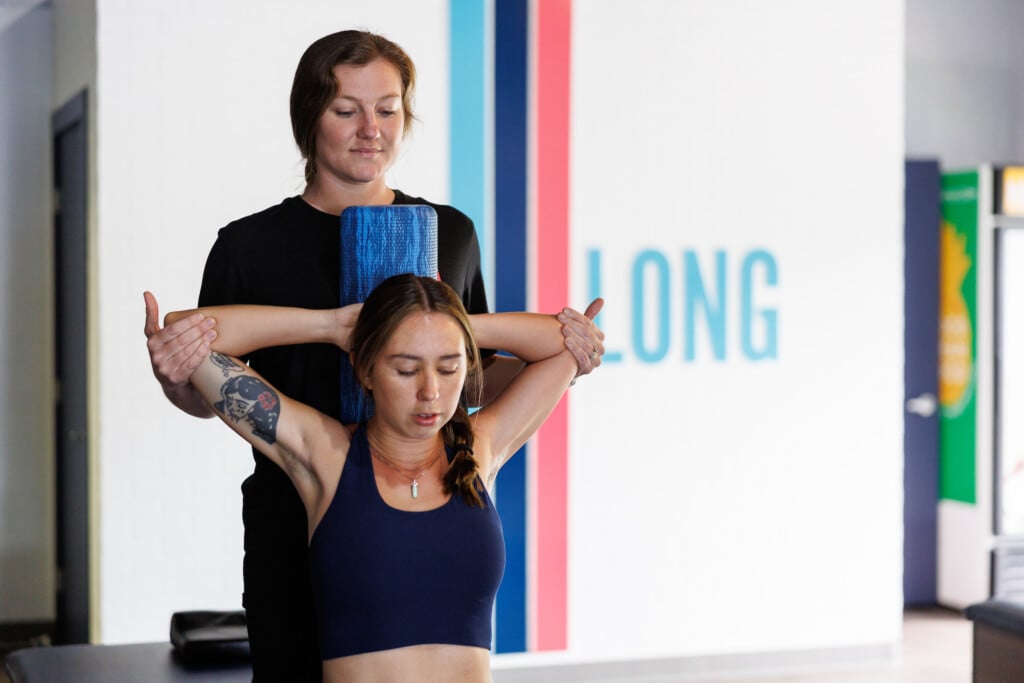
Hawaiʻi companies that offer services include StretchLab, which operates four locations on Oʻahu, with plans to expand to Maui at the beginning of next year. According to Adam Bogucki, StretchLab’s Hawaiʻi area director, the benefits of assisted stretching sessions include “increased flexibility, increased mobility, decreased pain, injury prevention and enhanced sports ability. We sometimes describe it as the perfect mix of like physical therapy and massage, it’s not as intense as physical therapy, and it’s also a little bit more whole body, but our results are a little bit more long lasting than just massage.”
Even if you are experienced and have been stretching independently for years, assisted stretching can be more effective than doing it solo. “When you stretch on your own, you’re using other muscles to stretch a certain muscle. When somebody’s doing it for you, it’s just that one muscle getting stretched, so it’s a little bit more on purpose and it also gets deeper into the stretch,” Bogucki explains.
Bogucki says the company’s client demographics are diverse, with members as young as 8 years old to over 100, ranging from athletes to individuals recovering from sedentary lifestyles.
StretchLab also partners directly with local businesses looking to integrate physical wellness into their corporate benefits.
“We kind of fit in this niche in employee wellness, where it’s something that can help with so many different areas,” Bogucki says. “It helps you be more comfortable at work, it helps you be more comfortable in your life, you’re going to get injured less, you’re going to be sick less if you’re taking care of your body.”
As much as professional equipment and services can help, you do not need to spend hundreds of dollars on an ergonomic chair or assisted stretching sessions to begin reversing the damage of spending 40 hours a week on the computer. The path to a pain-free workday starts with small, non-negotiable boundaries.
Simple adjustments, like going for a five-minute walk every hour or following a basic stretching tutorial on YouTube, can do wonders for your physical and mental alignment. By implementing daily microbreaks, you are treating your body with the same respect you give your deadlines.